Untangling the Multi-File & Multi-People Permissions Challenge
Summary (T.L.D.R)
- PROBLEM: Each quarter, workspace administrators had to manually duplicate financial documents to prepare for the upcoming quarter. Updating permissions for every individual file was time-consuming and repetitive. Additionally, the lack of folder-level permissions made it difficult to efficiently organize and manage related documents.
- TOOLS: Figma, Pendo, sketches, Workiva’s Webskin Design System, project plan, discovery document, personas, surveys, Google analytics.
- DISCOVERY: Multiple discovery loops of ideation, interviews, and engineer feedback.
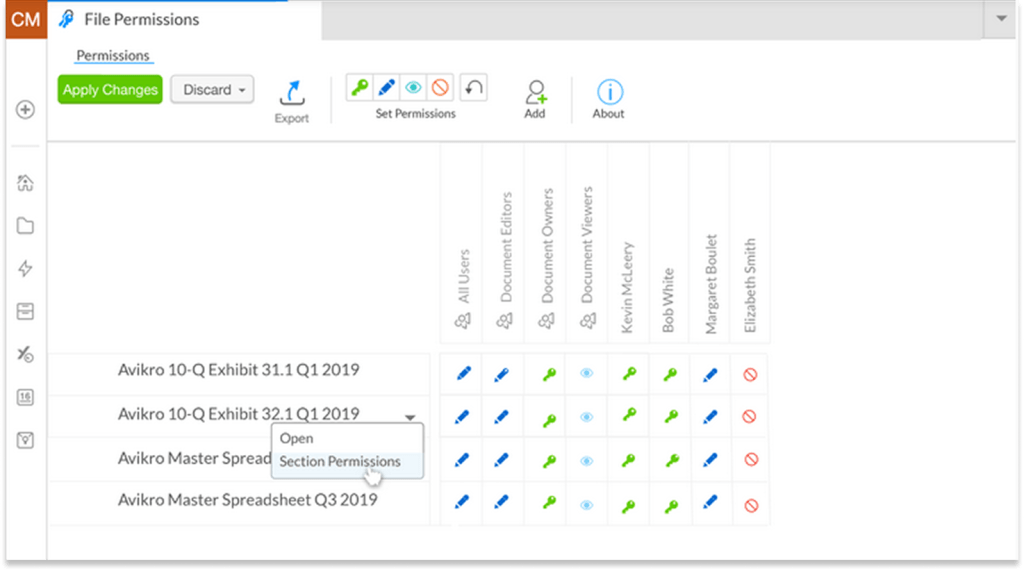
- RESULT: Folder-level permissions and a consolidated view of permissions across multiple files were added to the Workiva platform. This significantly reduced the time spent managing access during quarterly rollovers, enabling workspace administrators to more efficiently control permissions for entire groups of documents.
Background
Workiva originally built their platform on Adobe Flash. Everything in the Workiva platform was impacted by the decision by Adobe to sunset Flash. Since the entire platform had to be rebuilt, UX took the opportunity to question every piece of it. My team was responsible for the user experience for Content & Organization Management. (Features like file creation/copying/organization, Workspaces, adding/removing people to the platform, permissions to documents, role permissions etc.) My team consisted of one Product Manager, one Delivery Manager, one UX Designer (me!), five engineers, one tech lead and access to a shared UX researcher.
Problem
As a Workspace Owner, I would like to be able to quickly review and update the permissions to multiple files or folders at the same time, so I can be efficient and have confidence in my permission management.
Discovery
While we were already very confident that adding in permissions to our folder system would be something our users wanted (it was a frequent request of our customer support representatives), I spent time identifying the pain points in the current folder feature. Here are a few of the activities I did as part of the discovery phase.
I made a project plan (shared with my product manager).

I made a discovery document to record all the information we collected as well as any interview scripts or information gathered from engineers, CSMs or analytics.

I also:
- Interviewed several Customer Success Managers
- Reviewed any Idea tickets that had come in related to permissions on folders
- Created personas for who would be the ones most likely to use this feature and what problems were concerning them
- The Permissions Manager (Admin)
- Concerned about:
- Improving their processes
- Comparing permissions from one file to another (copy/paste)
- Employee back fill
- Concerned about:
- Auditers
- Concerned about:
- Needing to view many very specific files and ONLY those files
- Concerned about:
- The Permissions Manager (Admin)
Note: There was an existing system in the Workiva platform called the Advanced Permission Editor. However, it only let the user control the permissions for one document at a time. As an interesting bit of data, every single person I interviewed directly said they wanted the Advanced Permission Editor, but to be able to use it across many folders and documents all at once. It was a very strong indication of their mental model for how they would expect folder permission to be applied.

Iteration
I created some sketches and then had some discussions with the engineers about technical feasibility of the various options. They raised a concern about the collapsible regions in the table, our table component would likely not allow it. Once I felt I had a strong candidate I wanted to test with users, I created some higher fidelity mockups and decided to specifically see if they needed to be able to collapse the sections or were fine with it expanded.


Testing
I interviewed several customer success managers and regular users. The main takeaways from those interviews were:
- The primary focus of the multi-file APE would be to compare permissions
- It would be nice to be able to drill down into a specific document for sections, but not something they had to have
- Some customers would benefit immediately because they’re just quickly changing permissions
- A few customers indicated the mockups looked just like they had imagined it
Measuring success
I identified ways to measure success of the feature after it was released.
- Adding Google Analytics to measure:
- Launching a file’s permission editor from the Advanced Permission Editor (how often are they digging deeper into section permissions?)
- Where are they launching from: Folder, file in home, file in editor
- File types, number present, folder types, number nesting
- Preparing surveys to be sent 2 months after release and potentially calls for followups
- Would reassess the need for an inline section permissions addition at this time
Development
After the interviews, I was confident in my design and began to finalize them. I added annotations about components and the UI behavior so when the engineer began work they could understand how each component should behave without needing to directly ask me. As the engineers had been kept in the loop during all the previous steps, nothing in the design was a surprise.
As a part of finalizing the design for this project, I also:
- Addressed some UX/Tech debt of some missing or outdated error states
- Designed a new loading state
- Created a new feature tour using Pendo




Results
A few customers had expressed interest in being a part of a beta program so the first release was to them. Interviews with the beta testers indicated it was well received and Google analytics showed they were indeed using it. It was then released to the entire customer base. Customers then integrated the new folder permissions and the multi-file Advanced Permission Editor into their quarterly roll over process, reducing the amount of time spent managing their permissions for that process.
 Katie Cissell